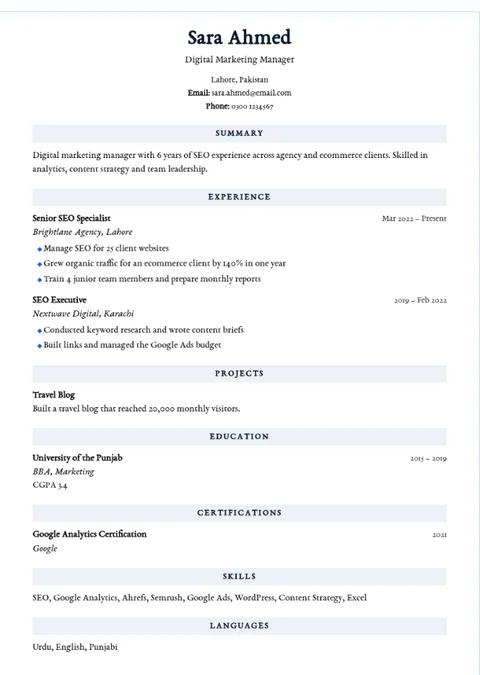
Classic resume template
A traditional layout with a centered name, clear sections and a timeless serif look.
Try Classic →
Choose a resume design after entering your details. Three formats, seven colors, font choices, and free PDF export.
Start building free →No signup · Free A4 PDF · No watermarkEvery WordToResume template works with the same chat. Pick your preferred layout, then adjust colors and fonts before downloading.
A traditional layout with a centered name, clear sections and a timeless serif look.
Try Classic →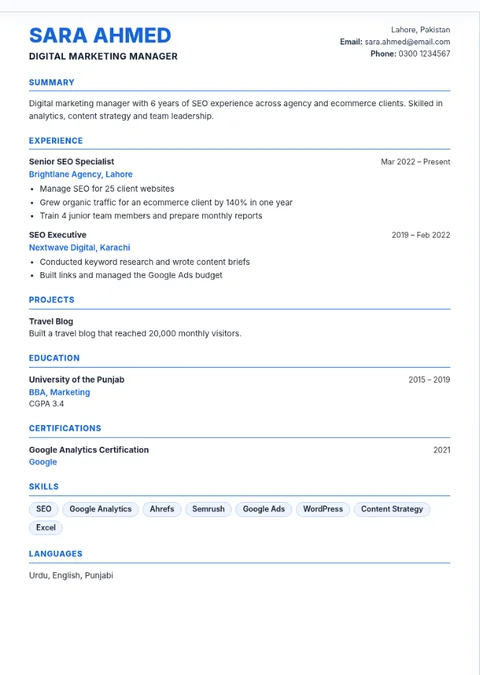
A clean contemporary layout with blue section headings and easy-to-scan information.
Try Modern →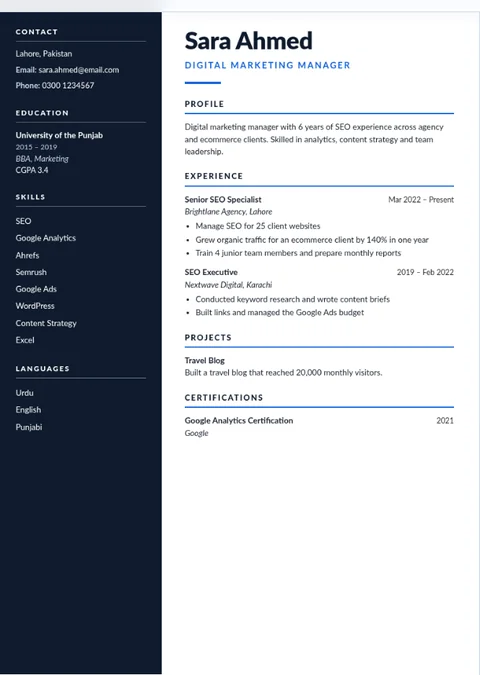
A sidebar design for presenting skills and career experience with a bold visual hierarchy.
Try Executive →Tip: Applicant tracking systems differ. For applications that request a simple one-column document, choose Classic or Modern and follow the employer’s instructions.
Making your first resume? You can start with education and projects instead of employment history.
Yes. Classic, Modern and Executive are included, with free PDF download and no signup.
A simple Classic or Modern layout makes coursework, skills and projects easy to read.
No resume design can guarantee compatibility with every applicant tracking system. Use simple headings and follow the job application instructions.
Yes. If your resume extends across multiple A4 pages, use the Previous and Next controls in the builder before downloading.
Yes. The builder has fonts and seven color options you can try without changing your resume content.
Write or paste your details into the chat. Choose a template. Download your PDF for free.
Make my resume free →